Your Android: Why Pixel UI vs. One UI Changes Everything
Dive into the conflict between Google's Pixel UI and Samsung's One UI. Discover which Android phone setup is best for you, based on efficiency, customization, and AI features.
Editorial Note
Reviewed and analysis by ScoRpii Tech Editorial Team.
In this article
You might think all Android phones offer a similar experience, but you'd be mistaken. No two Android phones are truly the same, especially not when you put Google’s Pixel UI head-to-head with Samsung’s One UI. This isn't just about different icons; it's a fundamental divergence in how you interact with your device every single day. So, which interpretation of Android is the right fit for you?
Key Details
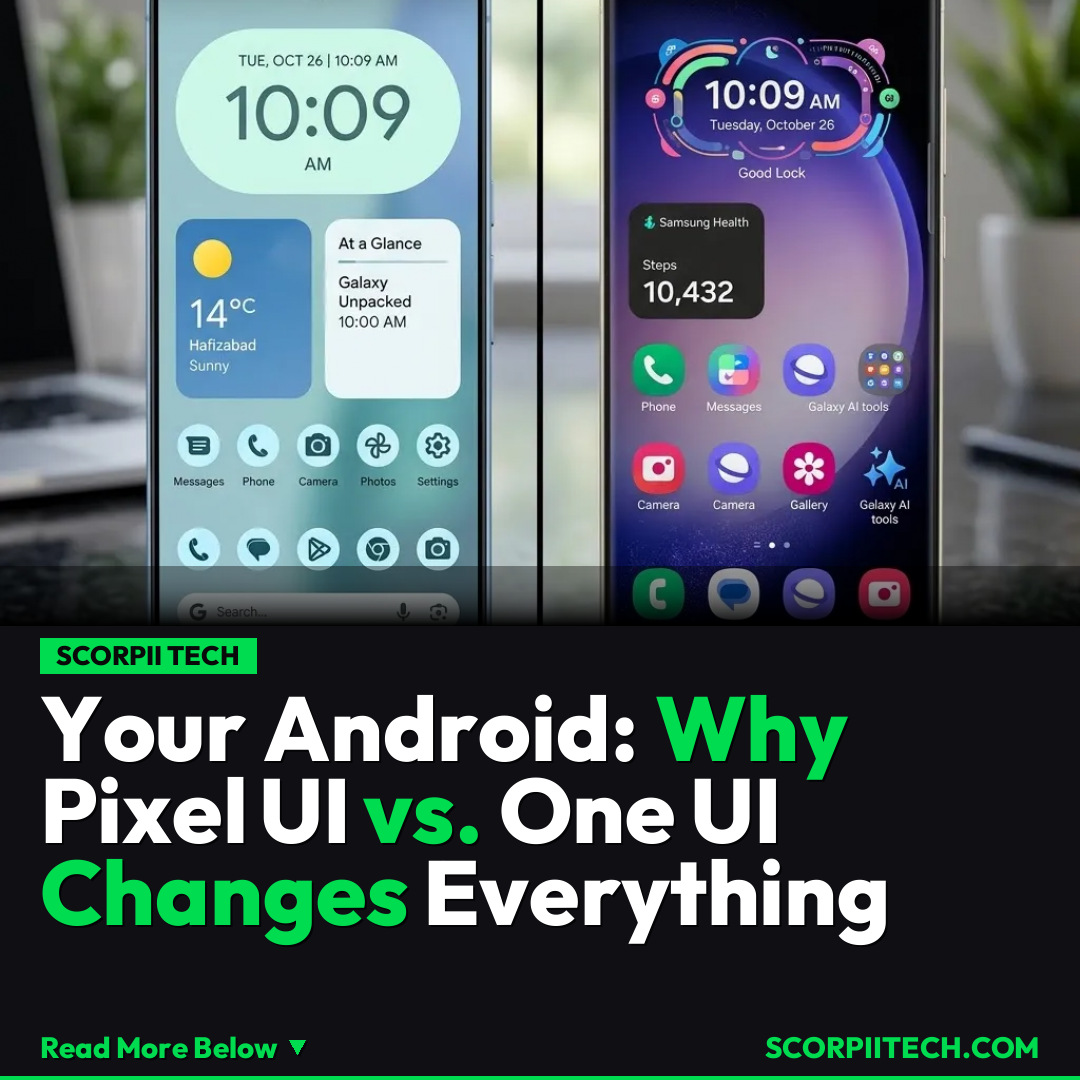
At the heart of this discussion lies a fascinating conflict between two tech giants: Google and Samsung, each with a distinct vision for your Android phone setup. Google's Pixel UI, introduced with Android 12 and evolving through to the anticipated Android 16, champions a philosophy of pure, efficient design. It's encapsulated by Material You Expressive, offering a visually cohesive and adaptive interface that seamlessly integrates with your chosen wallpaper colors. The Pixel Launcher emphasizes simplicity and quick access, reflecting the quote, "It's a UI driven by its efficiency." Google's approach is about providing a clean, uncluttered path to core Android functionalities.
Need fast, secure, and affordable hosting for your next website or PHP application? We recommend Hostinger Managed Hosting. Get premium speeds, a free domain, and 24/7 expert support.
On the flip side, Samsung's One UI, built atop the Android framework, offers a robust and highly customizable experience. Where Google prioritizes visual fluidity and efficiency, Samsung prioritizes user choice and extensive features. Through deep Good Lock integration, One UI allows you to tweak almost every aspect of your phone's appearance and functionality, from lock screen widgets to navigation gestures. Furthermore, the inclusion of cutting-edge innovations like Galaxy AI adds intelligent capabilities that Google's Pixel UI doesn't always match directly, offering a more feature-rich ecosystem right out of the box through apps like One UI Home.
The technical details underscore these differences. While both run on Android, Google's Pixel UI offers a direct, unadulterated interpretation, often showcasing new Android features as Google intends them. Samsung's One UI, however, acts as a comprehensive overlay, adding layers of customization and proprietary features. This means that while Pixel UI might feel more 'stock' Android, One UI gives you unparalleled control to mold your device precisely to your preferences, sometimes even before Google officially introduces similar features into its own system.
Why This Matters
This conflict between Samsung's One UI and Google's Pixel UI isn't merely a technical debate among developers; it profoundly impacts your daily digital life. If you value a clean, intuitive interface that prioritizes speed and seamless visual integration, Pixel UI's Material You Expressive design and efficient Pixel Launcher will likely appeal to you. It's an experience crafted for straightforward usability, minimizing distractions and maximizing a unified aesthetic. You get Google's vision for Android, pure and simple, ensuring prompt updates and a consistent user experience.
However, if you're someone who loves to personalize every detail, tweak settings, and leverage advanced features, One UI is built for you. The extensive Good Lock integration means you can transform your phone's look and feel far beyond what stock Android offers. Add to that the practical benefits of Galaxy AI, which brings smart, contextual tools directly into your workflow, and you have a powerhouse of customization and functionality. It’s about having the freedom to make your phone truly unique, adapting it to your specific needs rather than adapting to its design.
The Bottom Line
Ultimately, the "best" Android phone setup isn't universal; it's deeply personal. If you prioritize an efficient, minimalist, and visually cohesive experience with quick access to the latest Android updates, Google's Pixel UI is your champion. If, however, you thrive on deep customization, a wealth of exclusive features, and powerful AI capabilities, then Samsung's One UI will provide the flexibility you crave. You need to consider your own priorities: do you prefer a UI driven by its efficiency and purity, or one that empowers you with endless configuration and advanced intelligence? Your choice dictates not just your phone, but your entire daily digital interaction.
Originally reported by
BGRWhat did you think?



Stay Updated
Get the latest tech news delivered to your reader.